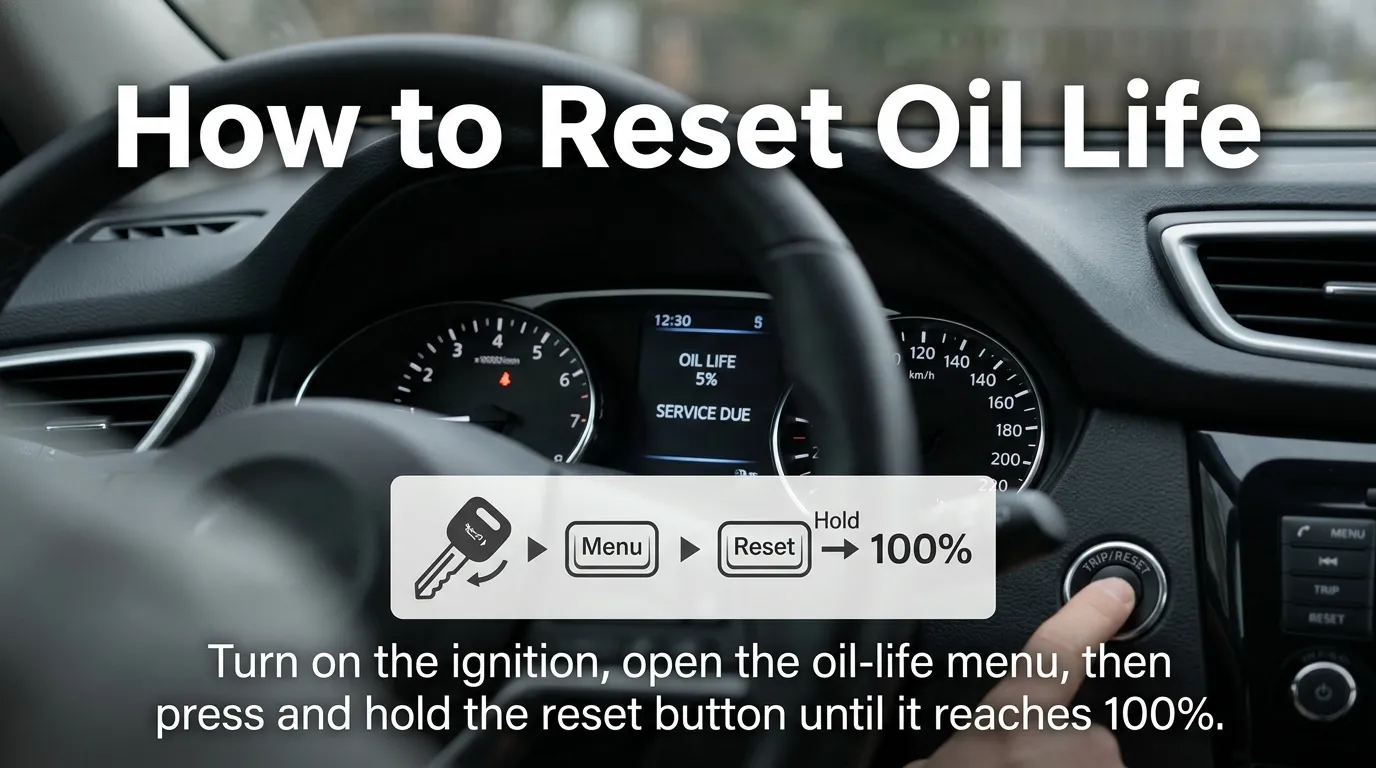
To reset oil life, turn your vehicle on without starting the engine when required, open the oil-life or maintenance menu, select the reset option, and confirm it.
The exact steps vary by make, model year, and trim.
Some vehicles use steering-wheel buttons, while others use a touchscreen or dashboard reset button.
Key Takeaways
- Reset the oil-life monitor after the oil service has been completed.
- The reset method is different for each vehicle.
- Many newer cars use steering-wheel controls or a touchscreen.
- The display should normally return to 100% after a successful reset.
- Check your owner’s manual if the menu or buttons do not match these steps.
How to Reset Oil Life After an Oil Change
If you just changed your engine oil and the dashboard still shows the old oil-life percentage, you usually need to reset the vehicle’s maintenance system.
The good news is that most modern vehicles let you do this without special tools. However, there is no universal button combination that works on every car.
Some vehicles use a steering-wheel control. Others use the center touchscreen. Older vehicles may use a trip button or a dedicated reset button.
Step 1: Turn the Vehicle to the Correct Power Mode
First, make sure the vehicle is parked safely.
Depending on the car, you may need to turn the ignition to ON without starting the engine. Push-button vehicles often enter this mode when you press the START button without pressing the brake pedal.
Other vehicles may allow the reset while the engine is running or with the ignition in a specific position.
For example, Mopar’s oil-life instructions specify that some systems require the engine to be off while the ignition is in the run position.
Step 2: Find the Oil Life Screen
Look through the instrument-cluster menus for a label such as:
- Oil Life
- Oil Life %
- Remaining Oil Life
- Oil Change
- Maintenance
- Maintenance Minder
- Vehicle Info
Use the buttons on the steering wheel, dashboard, or touchscreen to find the correct screen.
If you cannot find an oil-life menu, your vehicle may use a different maintenance system.
Step 3: Select the Reset Option
Once the oil-life percentage is displayed, look for an option such as Reset, Reset Oil Life, or Oil Life Reset.
Some vehicles require you to press and hold the OK, Enter, or SEL/RESET button.
For example, Honda’s Maintenance Minder systems use different controls depending on the model. Current Honda manuals describe selecting the Maintenance Minder screen, entering reset mode, choosing the maintenance item, and confirming the reset.
Step 4: Confirm the Reset
Confirm the reset when the vehicle asks you to do so.
A successful reset will usually change the display to 100% oil life or show a message confirming that the reset is complete.
Afterward, turn the vehicle off and back on if needed. Check the dashboard again to make sure the old maintenance reminder has disappeared.
How to Reset Oil Life on Different Types of Dashboards
Because vehicles use different dashboard systems, your reset process may look different from someone else’s.
Steering-Wheel Control Systems
Many newer vehicles let you reset oil life from the buttons or scroll wheel on the steering wheel.
A common process is:
- Turn the vehicle’s power on.
- Open the vehicle information or maintenance menu.
- Find Oil Life.
- Press and hold OK, Enter, or the appropriate control.
- Choose Reset.
- Confirm the selection.
- Check that the display returns to 100%.
Honda, for example, uses steering-wheel selector controls on several current models. Its 2026 Pilot manual describes entering the Maintenance Minder screen, holding the selector to enter reset mode, choosing the maintenance item, and confirming it.
Touchscreen Systems
Newer cars may put the reset option inside the center display.
A common menu path looks like:
Home → Settings → Vehicle → Maintenance → Oil Life → Reset
However, do not assume this exact path will work on your vehicle.
The menu names can change between model years and trims. Some vehicles keep the oil-life setting in the instrument cluster instead.
Older Button or Trip-Reset Systems
Older vehicles may not have a large touchscreen or advanced digital dashboard.
Instead, you may need to:
- Turn the ignition to the required position.
- Display the oil-life percentage.
- Press and hold the SEL/RESET, trip, or similar button.
- Wait for the display to flash or enter reset mode.
- Release and press the button again if the vehicle requires confirmation.
- Check for the new oil-life reading.
Older Honda systems, for example, can require holding the SEL/RESET button for more than 10 seconds before the reset menu appears.
How to Reset Oil Life on Popular Vehicle Brands
The exact process depends on the model and year, but these examples show how different systems can be.
Honda
Honda calls its system Maintenance Minder.
On many newer Honda vehicles, you can enter the Maintenance Minder screen, hold the steering-wheel selector to enter reset mode, choose the applicable maintenance item, and confirm the reset. Some models also provide a touchscreen method.
Older Honda vehicles may use a SEL/RESET button instead.
It is important to select the maintenance item that was actually serviced. Honda manuals specifically warn that failing to reset the system after maintenance can result in incorrect maintenance intervals.
Chevrolet and GM
Many Chevrolet vehicles display Remaining Oil Life through the Driver Information Center.
Depending on the vehicle, you may navigate to the oil-life screen and hold a control such as the thumbwheel or OK button until the system asks for confirmation.
Some Chevrolet models also support an accelerator-pedal reset procedure. However, this is not universal, so the owner’s manual for your exact model should be used before trying a pedal sequence.
Ram
Many Ram vehicles provide an Oil Life screen under the vehicle information menu.
Mopar’s instructions for certain Ram systems use the instrument-cluster controls: open Vehicle Info, select Oil Life, and hold OK to reset. Some systems also provide an alternate accelerator-pedal method with the ignition in the required position.
Ford
Ford vehicles can use different dashboard layouts.
On some Ford systems, the oil-life reset is found through a menu such as:
Settings → Vehicle → Oil Life Reset
Other Ford dashboards show the oil-life percentage under vehicle or engine information and provide a Hold OK to Reset instruction.
The model year and instrument-cluster screen matter, so use the instructions for your exact Ford.
Why You Should Reset the Oil Life Monitor
The oil-life display is a maintenance reminder. It helps you keep track of when an oil service is due.
After an oil change, resetting the system starts a new maintenance interval.
If you forget to reset it, the vehicle may continue displaying the previous oil-life calculation. Honda’s owner information specifically notes that failing to reset the system after maintenance can result in incorrect maintenance intervals.
The reset also helps keep your dashboard information consistent with your actual maintenance history.
One important point: resetting the oil life does not change the oil.
The reset only changes the vehicle’s electronic maintenance information.
What If the Oil Life Will Not Reset?
If the oil-life percentage stays the same, try these checks.
Make sure you are on the correct screen. Some vehicles have several maintenance screens, and the reset option appears only when Oil Life is selected.
Check the ignition position. Some systems require the engine to be off with the ignition in the ON or RUN position.
Hold the button long enough. Older systems may require several seconds before the reset menu appears.
Look for a confirmation screen. Selecting Oil Life is not always enough. You may need to choose Reset and confirm it.
Check the owner’s manual. The correct procedure can change between model years, trims, and dashboard systems.
If the vehicle still refuses to reset after following the correct instructions, a service shop can check the system.
Common Mistakes to Avoid
Resetting Before Changing the Oil
Do not reset the oil-life monitor simply because the percentage is low.
The reset is meant to record completed maintenance. Resetting it without changing the oil can make the dashboard show a fresh maintenance interval when the old oil is still in the engine.
Using Instructions for the Wrong Model
A reset method that works on one Honda, Ford, Chevy, or Ram may not work on another model year.
Even vehicles from the same manufacturer can use different dashboard controls.
Resetting Every Maintenance Item
Some vehicles combine oil service with other maintenance reminders.
If your system lets you choose individual items, reset only the items that were actually serviced unless your owner’s manual tells you otherwise.
Assuming the Reset Changes the Oil
It does not.
The electronic reset only changes the maintenance reminder. The engine still needs the correct oil and filter service at the proper interval.
FAQs About Resetting Oil Life
Reset oil light Honda
To reset the oil light on a Honda, turn on the vehicle without starting the engine, open the oil-life display, and hold the reset or select button until the percentage resets.
Reset oil light Honda Civic
The Honda Civic oil light or oil-life reminder can usually be reset through the vehicle’s information display or steering-wheel controls, depending on the model year.
How to reset oil life Toyota
On many Toyota models, you can reset the oil maintenance reminder through the dashboard controls after an oil change. The exact steps vary by model year.
How to reset oil life Ford
Ford vehicles commonly allow the oil-life monitor to be reset through the instrument-cluster menu. Select the oil-life option and follow the on-screen reset instructions.
How to reset oil life Ram 1500
For many Ram 1500 models, use the instrument-cluster controls to find the oil-life or oil-change reminder and select the reset option after servicing the vehicle.
How to reset oil life Honda Pilot
The Honda Pilot oil-life reminder can generally be reset through the vehicle information display or steering-wheel controls, with the exact procedure depending on the model year.
How to reset oil life chevy malibu
On many Chevy Malibu models, the oil-life system can be reset using the driver-information controls after the oil has been changed.
How to reset oil life chevy
Many Chevy vehicles let you reset the oil-life monitor through the driver-information center. The button sequence can differ between models and years.
Humanize 269 words
Conclusion
Learning how to reset oil life is usually simple once you know which dashboard system your vehicle uses. The basic process is to turn the vehicle to the correct power mode, find the oil-life or maintenance screen, select the reset option, and confirm it.
The most important part is using instructions for your exact vehicle. Honda, Chevrolet, Ford, Ram, and other manufacturers use different controls and menu paths. Manufacturer documentation confirms that the procedure can vary by model and system.
Most importantly, reset the monitor after the oil service has actually been completed. A dashboard reset records maintenance electronically; it does not replace the oil change itself.

I’m Nicholas Sparks, and storytelling has always been my passion. Through TheBiblimeaning, I share insights about my books, unforgettable characters, romance, emotions, and the deeper meanings behind my stories. This platform brings readers closer to my writing journey, latest releases, and the inspiration that shapes every novel I create.